

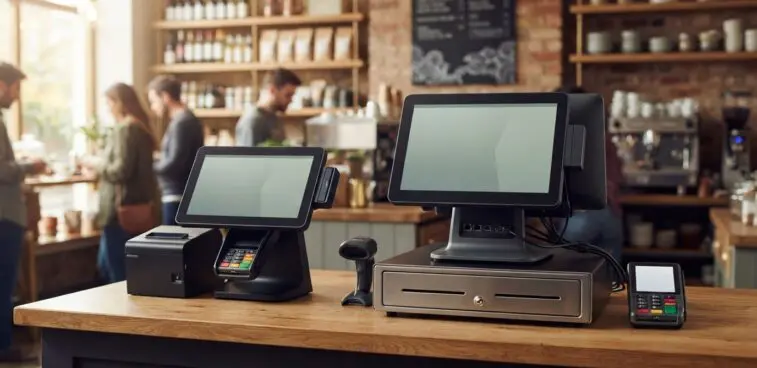
There is no single winner in an Aures Yuno vs commercial EPOS hardware comparison. The right choice depends on whether each terminal’s connections, peripheral ports, display size and resolution suit your business. Compare those specifications with your intended setup instead of assuming one type of hardware will fit every checkout or service point.
A compact terminal can suit a space-conscious counter, while a different configuration may work better when your workflow relies on specific peripherals or a larger display. This guide explains how to compare the relevant specifications, what they mean in daily use and which practical requirements should shape your decision. You’ll have a clearer way to assess fit, from the devices you need to connect to the screen staff will use during service.
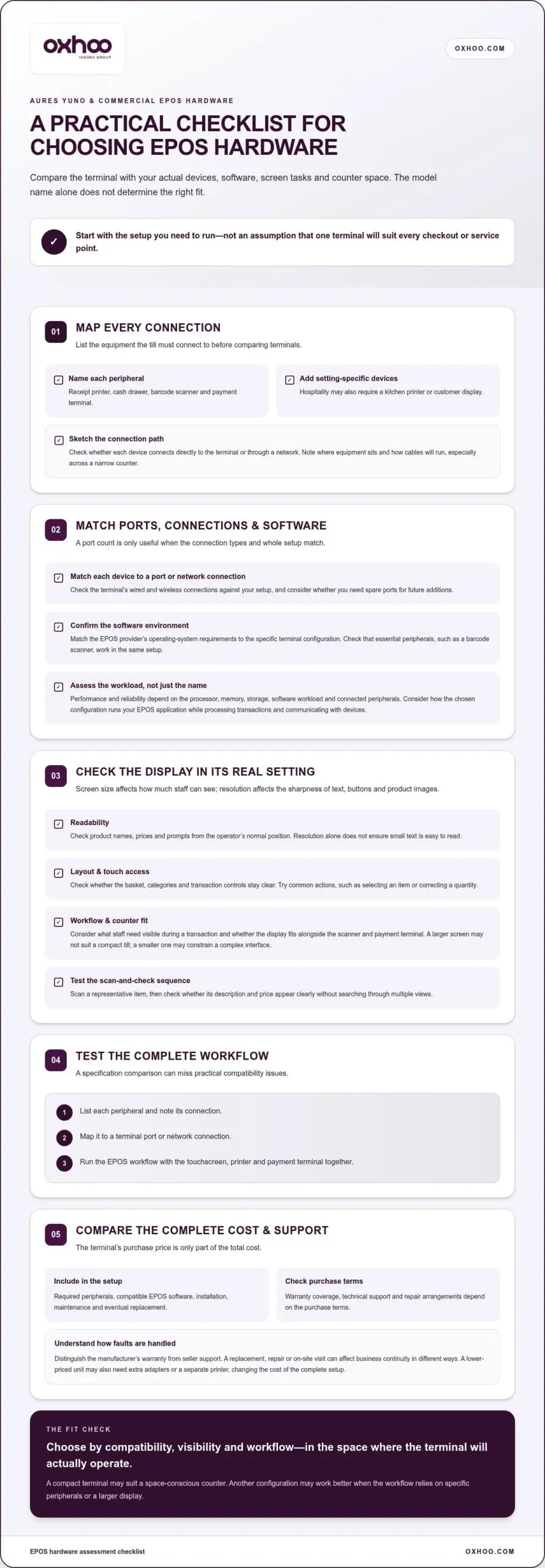
Start with the equipment your till must connect to: a receipt printer, cash drawer, barcode scanner or payment terminal. In hospitality, a touchscreen terminal may also need to connect to a kitchen printer or customer display. List every device before comparing the AURES Yuno with other commercial EPOS hardware.
Performance and reliability depend on the processor, memory, storage, software workload and connected peripherals, not just the terminal’s name. When comparing the AURES Yuno, assess how the chosen configuration runs your EPOS application while processing transactions and communicating with devices such as receipt printers.
Connectivity describes how a terminal exchanges data with other systems and peripherals. Check its wired and wireless connections against your actual setup. For instance, a counter using a networked printer has different requirements from a compact till with a directly connected scanner.
Peripheral ports connect equipment physically. Match each device’s connection type to the terminal’s port list, then consider whether you need spare ports for future additions. A setup with a cash drawer, printer and scanner may need different ports from a touchscreen-only service point.
Compare the full connection path, not just the number of ports. A printer might connect directly to the terminal or through a network, while a payment terminal may have its own connection requirements. Note where each device will sit and how cables will run, especially across a narrow hospitality counter.
The terminal’s purchase price is only part of the total cost. Include required peripherals, compatible EPOS software, installation, maintenance and eventual replacement in your comparison. A lower-priced unit, for example, may need extra adapters or a separate printer, changing the cost of the complete setup.
AURES Yuno compatibility with operating systems and EPOS software depends on the software’s supported environment and the terminal configuration. Match the EPOS provider’s operating-system requirements to the unit, then confirm that essential peripherals, such as a barcode scanner, work within the same setup.
For AURES Yuno hardware in the UK, warranty coverage, technical support and repair arrangements depend on the purchase terms. Distinguish the manufacturer’s warranty from seller support, and understand how faults are handled during and after coverage. A replacement, repair or on-site visit can affect business continuity in different ways.
Before choosing, make a simple assessment: list each peripheral, note its connection and map it to a terminal port or network connection. Then test the EPOS workflow with the touchscreen, printer and payment terminal together. This can reveal practical compatibility issues that a specification comparison alone might miss.
Compare AURES Yuno display specifications with the screen requirements of your EPOS software, rather than judging the screen by appearance alone. Size affects how much information staff can see at once; resolution affects the sharpness of text, buttons and product images. Both influence the experience at a retail counter.
Start by listing what an employee needs to see during a typical transaction. A shop assistant might need product descriptions, prices, promotions and a basket visible together. If the interface requires frequent scrolling or switching screens, consider whether a larger display or a more streamlined EPOS layout would better support the workflow.
Resolution is the number of pixels used to form an image on the display. More pixels can show finer detail, but the benefit depends on screen size, viewing distance and software interface. Small text on a high-resolution screen, for example, can still be hard to read if the EPOS layout is crowded or viewed from an awkward angle.
Assess touchscreen use where the terminal will actually operate. At a busy till, staff may need to select product categories, adjust quantities and apply discounts while keeping the basket in view. Check that touch targets are easy to distinguish and reach, particularly when the display is angled towards the operator.
Barcode scanning adds another practical consideration. A cashier might scan an item, then use the display to check its description and price. Test that sequence with representative products and your intended EPOS software. The screen should show the resulting information clearly without making the operator search through multiple views.
Compare the AURES Yuno with other commercial terminals using the same software layout and viewing position. Record each candidate’s display size and resolution, then assess the interface at its normal operating distance. This is more meaningful than placing two screens side by side with different settings.
Use this short assessment during a product evaluation:
For mobile checkout, screen size also affects how easily staff can carry and position the device. Compare mobile checkout solutions against the same readability and workflow criteria, particularly where staff serve customers away from a fixed retail counter.
Choose a display that presents essential information clearly in its intended setting. A larger screen is not automatically better if it crowds a compact till, while a smaller one may constrain a complex EPOS interface. The deciding factors are the software layout, staff actions and available counter space.
Assess AURES Yuno specifications against the exact terminal configuration and the work it will perform. The model name alone won’t tell you whether a particular unit suits a busy till, compact counter or hospitality service point. Compare its processor, memory, storage, display and connections with your EPOS software’s requirements.
Start with the processor and memory. These components affect how smoothly the terminal runs its operating system, EPOS application and background tasks together. A retail interface with product images and reporting tools, for example, may place different demands on the system than a basic till screen. Judge performance using the software and tasks planned for your business.
Next, consider storage and the operating environment. Storage holds the operating system, application and locally stored data, while the software’s compatibility requirements determine which system configuration is suitable. Before comparing an AURES Yuno with another commercial terminal, note the EPOS application, its supported operating system and any hardware requirements.
The display is part of the working specification, not a finishing detail. Compare screen size, resolution and touchscreen behaviour with the interface staff will use. A product search, basket and payment prompt should remain legible and accessible from the operator’s normal position. Evaluate each candidate using the same EPOS layout.
Connectivity must also suit the planned equipment. List the printer, cash drawer, barcode scanner and payment terminal, then map their connections to the unit’s available ports or network options. This shows whether the proposed configuration supports the entire checkout, not just its central screen.
Use this specification checklist when reviewing an AURES Yuno quotation or product configuration:
When comparing AURES Yuno with commercial EPOS hardware, don’t treat any single specification as a complete measure of performance. A processor may look suitable on paper, but the result also depends on software demands, memory, connected devices and tasks running together. Compare complete configurations under the same operating conditions.
For a useful decision, record the exact configuration, software and peripherals for each candidate side by side. Test common actions, such as opening a transaction, searching for an item and printing a receipt. This turns a specification sheet into a practical assessment of how well the setup fits your business.
Relevant specifications include the processor, memory, storage, operating system, display size and resolution, touchscreen capability and available connections. The right configuration depends on your EPOS software requirements, peripherals and intended workflow.
There is no universal UK price for an AURES Yuno configuration. The cost depends on the terminal specification, peripherals and any associated setup or support included in the quotation. For a useful comparison, assess the complete checkout arrangement, not just the terminal.
Start by defining the hardware you need. A unit configured for a basic till may differ from one supporting a touchscreen workflow, receipt printer, cash drawer and barcode scanner. List each required component, then compare quotations covering the same equipment and configuration.
The processor, memory, storage and display configuration can affect how well a unit suits your EPOS application. A retail interface with product imagery and reporting tools may have different requirements from a simpler till screen. Compare the specified hardware with your software’s requirements instead of choosing by model name alone.
Peripheral requirements also affect the overall purchase. A printer, scanner or payment terminal might be included in a proposed bundle or priced separately. Review the quotation line by line to distinguish the terminal from additional equipment and any installation work.
EPOS software and hardware are separate parts of the overall system. Software licensing or subscription arrangements can affect ongoing costs, while the terminal quotation covers the stated hardware. Keep these costs distinct in your budget, particularly when comparing an AURES Yuno proposal with another commercial EPOS setup.
Costs continue after purchase. Consider the stated warranty, support and repair arrangements, along with how peripherals will be maintained or replaced. A receipt printer fault, for example, could disrupt service even if the terminal remains operational. Compare the terms attached to each proposal rather than relying on assumptions about coverage.
Use this comparison checklist before approving a UK quotation:
Then compare the total cost for the same operating setup and intended service period. A lower initial quotation may cover fewer peripherals, while a more complete proposal may include equipment and setup. Keep the comparison consistent, and account for recurring software costs separately.
Ask for the quotation to specify the terminal configuration, included components and any separately priced work. This breakdown makes the UK cost easier to understand and shows where two AURES Yuno or commercial EPOS proposals differ in scope.
Compare the full cost of the same operating setup over the same intended service period, including hardware, peripherals, software, setup, support and repair arrangements. A lower initial quote may cover less equipment or support, so it may not mean a lower total cost of ownership.
The AURES Yuno competes with commercial EPOS terminals designed for fixed counters, including compact all-in-one units and more modular systems. The useful comparison isn’t simply one brand against another. It’s whether each complete setup suits your EPOS software, peripherals, counter layout and daily workflow.
Compact all-in-one terminals combine the display and computing hardware in one counter unit. They can suit a retail till where space and a tidy installation matter. Compare the screen, processor, operating system and peripheral connections, then check that the chosen configuration supports your intended software and equipment.
Modular EPOS systems separate components such as the touchscreen, computer and customer-facing display. This can suit a business that wants flexibility in equipment positioning or a specific checkout layout. It may also mean more components to accommodate, connect and manage. Compare the assembled system, not just its central computer.
Mobile POS terminals are another option for businesses serving customers away from a fixed till. A restaurant might use a handheld device to take orders at a table while retaining a counter terminal for transactions. Compare portability, screen usability, software compatibility and the peripherals needed at each service point.
For a useful AURES Yuno vs commercial EPOS hardware assessment, shortlist systems by intended use. A pharmacy checkout, café counter and fashion shop may each prioritise different functions. One might need a clear product-search workflow, another may depend on order entry, and another may rely on efficient barcode scanning.
Use a consistent evaluation process:
During a demonstration, run the same transaction through each candidate. For example, scan a product, change its quantity, follow your usual workflow and print a receipt. Observe how the screen responds and how staff move between steps. This practical test can reveal differences a specification list alone won’t show.
No single competitor suits every UK business. The best alternative is the terminal or system that meets your operational requirements without adding unnecessary complexity. Compare complete configurations, then choose according to the tasks, space and equipment your business actually needs.
No single competitor suits every checkout; the right choice is the configuration that supports your workflow without adding avoidable complexity. Before committing, confirm how the system handles routine transactions and whether the full setup fits the counter and staff habits. Keep the decision grounded in actual use: a useful demonstration should make common tasks clear, and the proposed equipment and support arrangements should be easy to understand. These checks tie the decision to practical requirements rather than broad claims.
Selecting the right hardware partner ensures long-term operational stability and straightforward day-to-day management for your business.
OXHOO supplies POS terminals for businesses comparing the AURES Yuno with commercial EPOS hardware. The right configuration depends on your counter layout, software requirements, connected peripherals and daily transaction flow. Assessing those needs helps you identify a terminal setup that fits your operation, rather than choosing hardware by appearance alone.
For a fixed checkout, consider how the terminal will support staff workflows and essential equipment. If customer journeys extend beyond the counter, self-service kiosks, digital signage and digital menu solutions can support a broader in-store experience. Each serves a different purpose, so choose according to the service environment and operational priorities.
If you’re planning or refining a commercial EPOS setup, visit oxhoo.com to discuss your business’s hardware requirements.
The AURES Yuno vs commercial EPOS hardware decision can raise a broader question: how should customer-facing technology evolve alongside your business? A checkout redesign may be a good time to consider how staff serve customers, how information appears in-store and where self-service could fit. Looking across these touchpoints can help create a more coherent environment instead of treating each device as an isolated purchase.
OXHOO supplies POS terminals, self-service kiosks and digital signage for different parts of the in-store experience. The right direction depends on your operational priorities and the role each solution needs to play. Discussing those priorities can help turn them into a clear next step.
Contact OXHOO to discuss your EPOS needs and explore a setup aligned with your business. With a clear view of your requirements, you can move forward with confidence.
Total ownership costs include peripherals, compatible EPOS software, installation, maintenance and eventual replacement, not just the terminal’s purchase price. A lower-priced unit may need extra adapters or a separate printer, changing the cost of the complete setup.
A compact terminal can suit a space-conscious counter, while another configuration may better support specific peripherals or a larger display. Compare connectivity, ports, screen size and resolution with your retail or hospitality workflow. The right fit depends on those requirements.