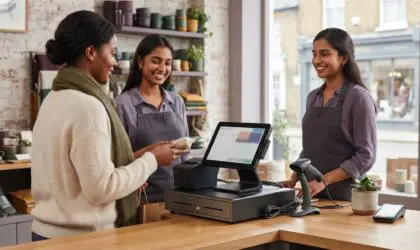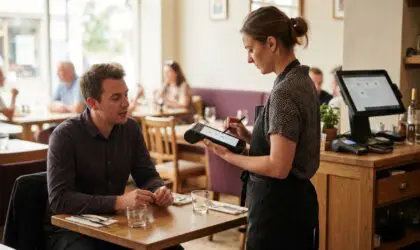


A mobile POS terminal should keep pace with your business, not dictate how you work. A handheld can take card payments when it supports card acceptance and is configured with a compatible payment service. A mobile POS system can connect over Wi-Fi or mobile data.
Portability matters, but the right choice also depends on where staff take payments, how the device fits into daily service and how it connects to the rest of your till setup. A compact handheld can suit table service or queue-busting, while a fixed checkout may work better when payments are always processed in one place.
This guide explains how mobile POS systems work, what makes handheld card payments possible and what to consider when choosing a device. It covers how to match a terminal to your workflow, including connectivity, handling and the pace of daily operations.
Yes, a handheld can take card payments when its payment setup supports card acceptance. The right choice also depends on accepted payment methods, security procedures and how payments fit into order handling.
Card acceptance depends on the payment service and terminal configuration, not portability alone. Check whether the setup supports the methods your customers use, such as contactless cards, chip and PIN, or mobile wallets.
QR payments work differently: a customer scans a code and pays through the linked payment method. Check that the till workflow records the payment against the correct order. For example, a café’s QR payment at a table should reconcile with the same bill as a card payment taken with a handheld reader.
First, choose between an integrated payment POS device and a separate reader paired with a tablet. An integrated device can combine order entry and payment, while a separate reader may suit a setup where staff already use tablet software. Either way, connect the payment service and configure the methods your business accepts.
Tap to Pay uses a compatible device to accept contactless payments without a separate reader, when supported by the payment service. Don’t assume every handset has this feature. Hardware costs vary by configuration, while transaction fees depend on the payment provider and its pricing arrangement. There is no single fixed UK charge for every business.
PCI DSS is a payment-card security standard relevant to protecting card data, not a hardware certification. Contactless limits depend on the payment method and applicable payment arrangements, so the handheld itself does not have one universal UK limit.
If a device is lost or stolen, follow a clear incident process: promptly report it to the relevant payment provider or administrator, restrict access where possible and review recent transactions. Set staff access carefully, and don’t leave an unlocked terminal unattended. These steps help address unauthorised device use and suspicious activity on its payment account.
In a restaurant, staff can use a handheld to enter an order at the table, send it through connected software and return with the bill. Taking the reader to the customer can reduce trips between tables and a fixed till. The benefit depends on reliable connectivity throughout the service area and a workflow that keeps each order linked to its table.
Payments reach a UK business bank account according to the provider’s settlement terms. Timing depends on its processing arrangements and the business account setup, so payout speed varies between handheld payment systems. For hospitality teams, consider how order changes, split bills and payment completion appear in the same transaction record.
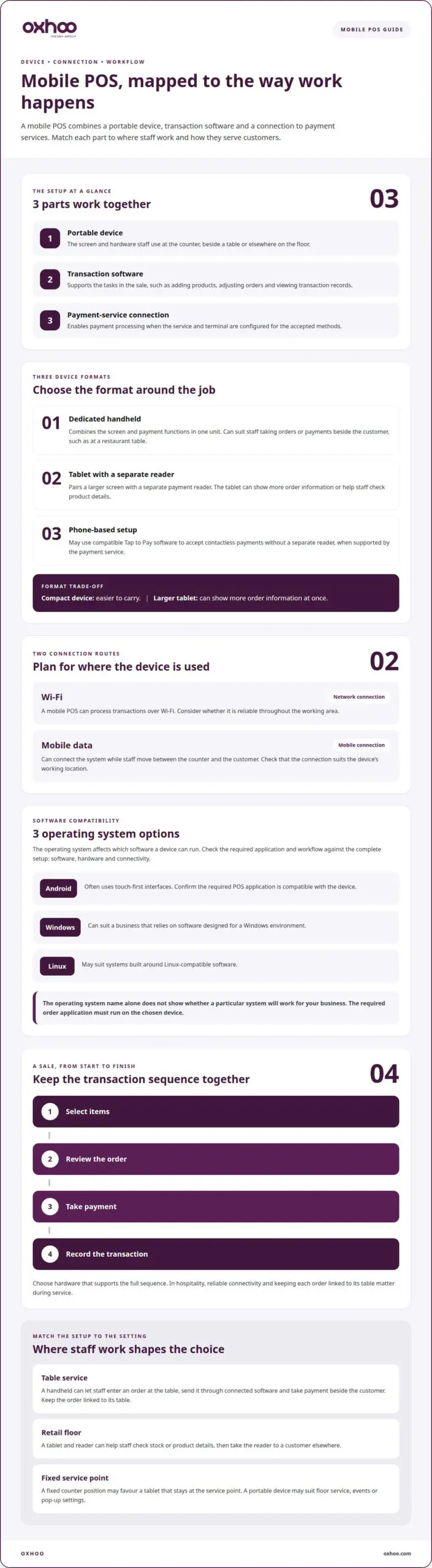
A mobile POS system combines a portable device, transaction software and a connection to payment services. In the UK, it can process transactions over Wi-Fi or mobile data, allowing staff to move between the counter and the customer.
POS device types differ in how staff enter orders and take payment. A dedicated handheld combines the screen and payment functions in one unit. A tablet-based setup pairs a larger screen with a separate reader, while a phone-based setup may use compatible Tap to Pay software. The best fit depends on where staff work and how much information each transaction requires.
For example, hospitality staff might use a handheld to record an order beside the table. A retailer could use a tablet and reader to check stock or product details, then take the reader to a customer waiting elsewhere. A compact device can be easier to carry, while a larger tablet can show more order information at once. Consider screen size, handling and the steps staff need to complete a sale.
Consider how the device moves through the working day. A fixed counter position may favour a tablet that stays at a service point. Floor service, events or pop-up settings may suit a portable device that moves with staff. In either case, the hardware should support the full sequence: select items, review the order, take payment and record the transaction.
Android, Windows and Linux are operating systems used in POS environments. The operating system affects which software a device can run and how it fits an existing setup. Before choosing hardware, list the essential tasks, such as adding products, adjusting orders and viewing transaction records. Then check which operating system supports the software needed for those tasks.
Android-based POS devices commonly use touch-first interfaces, which can suit staff moving between orders and payment screens. Android software may be installed through an app marketplace, sometimes labelled an AppMarket. Check that the required POS application is compatible with the device and supports the workflow. An app catalogue alone does not mean every application will work on every terminal.
Windows can suit a business that relies on software designed for a Windows environment. Linux may suit systems built around Linux-compatible software. The operating system name alone does not show how a particular system will perform: the software, hardware and connectivity all need to work together. For example, a device that cannot run the required order application will not support service effectively.
Assess the complete setup, not just the operating system label. Consider the device’s role, the software it must run and whether Wi-Fi or mobile data suits its working location. Together, these factors determine whether a mobile POS terminal supports flexible service or adds steps at the counter.
Choose hardware around the steps staff complete at the point of sale, from selecting items to issuing a receipt. A shop floor, restaurant and mobile service desk each place different demands on a portable screen and its controls.
A handheld suits workflows where staff need to move between customers rather than stay behind a counter. In a clothing shop, for example, an assistant could check an item, enter the sale and take payment beside the customer. The compact format keeps those actions together, but the display still needs to be clear enough for accurate product selection.
Map the transaction before choosing hardware. Staff may need to search for products, amend quantities, apply a discount or return to an order. Extra screens or menus can slow a busy service point, so assess how many actions a typical sale requires. A hospitality team handling custom orders may need more visible order details than a team selling a small range of standard items.
Consider how staff will carry and use the device throughout a shift. A one-handed grip can help staff serve customers while moving between shelves, tables or queues. Controls should be easy to reach without obscuring the screen. The best mobile POS terminal supports the actual sequence of work, not simply the smallest available format.
Before deciding, sketch a typical customer journey: locate the item, confirm its details, take payment and provide a receipt. Then assess whether staff can complete those steps with the handheld without returning to a fixed till. This practical sequence shows whether portability improves service or adds unnecessary handling.
A portable POS device with a built-in printer can produce a paper receipt at the point of sale. This can suit a market stall, delivery handover or service desk where returning to a fixed printer would interrupt the transaction. The printer adds one practical task: managing receipt paper as part of daily operations.
Compare the receipt workflow with customer preferences and business procedures. For example, a retailer may offer printed receipts at a temporary sales point, while another workflow records the transaction digitally. A built-in printer keeps printing close to the sale; a separate printer adds another device to position and connect.
Review the complete hardware setup, including the display, printer access and charging arrangements. Staff should be able to read the order while holding the device and replace paper without disrupting service. A device that prints receipts but makes item selection awkward may slow the point of sale rather than streamline it.
Test the fit with a representative sale: enter several items, change a quantity, complete payment and print the receipt. This brings handling issues to light before the device becomes part of everyday service. Choose the portable format that supports these tasks smoothly, whether or not the workflow needs printing at the customer’s side.
A mobile POS combines a portable device, point-of-sale software and payment capability. Unlike a card reader alone, it can also manage sales information. Unlike a traditional fixed till, staff can use it away from the counter.
A typical sale follows a clear sequence: staff select products, review the order and take payment. The software records the transaction, while the device connects through Wi-Fi or mobile data. For example, a shop assistant can scan a barcode, check the basket on screen and take a contactless payment beside the customer.
Hardware and software work together, but each has a distinct role. The display presents product and order information; a built-in or connected reader handles payment. A printer can produce a receipt if the setup includes one. The chosen software determines which sales tasks the POS system supports, such as editing an order or recording a completed transaction.
Mobility changes where staff can serve customers. In a busy shop, an employee can use a handheld to help someone waiting away from the checkout. At a service counter, staff can bring payment to the customer rather than direct them to another till. This can make the transaction more direct.
A mobile POS can also bring sales actions together on one device. For instance, staff may scan a barcode, confirm the item and take payment without switching between separate service points. The practical benefit depends on the software and hardware working as one system. A small screen that makes order details difficult to read may slow staff despite the device’s portability.
Consider which tasks happen most often. A retailer might prioritise product lookup and basket changes, while hospitality staff may need a clear view of each table’s order. Matching the device’s functions to those tasks helps avoid unnecessary steps. It also clarifies whether the business needs an all-in-one system or just portable payment acceptance.
A device’s processor runs its software, while a payment processor handles the transaction between the payment method and the business’s account. These are different roles. Android, Windows and Linux systems can support POS applications, but software compatibility determines which functions are available on each device.
A card reader focuses on accepting payments. A mobile POS terminal can combine payment with sales tasks, such as selecting items or reviewing an order. A traditional till usually stays at a fixed point of sale and can suit businesses where customers always pay at the counter. Compare what each setup lets staff do, not just whether it accepts contactless payments.
A reader paired with a separate system may suit staff who already record orders elsewhere. A mobile POS setup can reduce that separation when compatible software brings the steps together. Compare the transaction sequence, barcode handling, receipt needs and operating system before deciding. These details show whether mobility supports the workflow or simply moves payment hardware around.
The best handheld for a UK business is the one that supports its selling process, software and service environment. Match the device to where customers pay, what staff need to record and how receipts are issued.
Start with the working day. A retail team serving customers across a shop floor has different needs from a café taking orders at tables or a market stall selling from a temporary counter. Map the steps from selecting an item to completing the sale, then identify where a portable device would help.
Use these practical checks to narrow the choice:
For example, a clothing retailer may prioritise barcode scanning and product lookup, while a food stall may value a compact device and direct payment. Hospitality staff might need to review an order before presenting the bill. These examples show why a feature list alone cannot identify the right device.
Next, assess the complete setup rather than the handset alone. Include any separate reader, printer, charging equipment and software requirements in your decision. Genuine UK-specification terminals include standard UK three-pin power leads, so consider the power arrangement too. Also review transaction charges as part of the payment arrangement, without confusing those fees with hardware selection.
Finally, walk through a representative sale with the intended device. Enter an order, make a change, take payment and produce the required receipt. Notice where staff pause, repeat an action or need another device. This simple workflow test shows whether the hardware supports efficient selling or creates friction at checkout.
Choose a setup around those daily tasks, not an abstract idea of flexibility. To explore hardware suited to your workflow, view mobile POS options.
The best mobile POS terminal fits your business’s selling workflow, POS software and service environment. Compare how it handles order entry, payment, receipts and connectivity, then test it with a representative sale. For UK use, also consider the power arrangement for the complete setup.
OXHOO helps UK businesses match commercial hardware to how staff serve customers. Its POS terminals and mobile POS solutions support businesses choosing between a fixed checkout and a more flexible payment point. OXHOO also supplies self-service kiosks for self-directed customer journeys and digital signage for on-site communication.
Start by defining the workflow: where transactions happen, what staff need to do and how customers move through the space. OXHOO’s commercial hardware is designed for demanding, all-day operation, with attention to functionality and presentation. It is a practical next step when your current setup no longer suits your business’s pace or layout. Contact OXHOO to discuss POS hardware for your workflow.
Choosing a mobile POS terminal is an opportunity to shape the customer experience, not simply replace a piece of equipment. Consider how checkout should work as your business changes, with an experience that feels composed, accessible and consistent throughout the customer journey.
OXHOO supplies POS terminals, self-service kiosks and digital signage to support the physical points where customers browse, order and pay. The next step is to match your preferred device format to the service environment and the experience you want to create.
Share the setting, staff workflow and customer journey you want to support. That gives the conversation a clear starting point, whether you are refining a single payment point or planning a more unified environment.
Contact OXHOO about mobile POS to discuss a setup aligned with your business. A well-chosen system can give your team a more purposeful foundation for service.
A mobile POS terminal can support secure payment handling when the payment setup and staff procedures are properly managed. PCI DSS is the relevant payment-card security standard, but it does not guarantee that every device or business setup is compliant. If a handheld goes missing, report it promptly through the payment account’s incident process, restrict access where possible and review recent transactions for unfamiliar activity.
Choose a setup by mapping the tasks staff perform during a typical sale. A retailer might need product lookup and barcode scanning, while a café may prioritise clear order details and payment at the table. Compare screen size, handling, software compatibility, connectivity and receipt needs. Then walk through a representative transaction to see whether the hardware supports the workflow without unnecessary steps.
Staff can take an order or payment where the customer is, rather than sending them to a fixed till. In a restaurant, this can keep order entry close to the table; in a shop, staff can serve a waiting customer away from the main checkout. The benefit depends on reliable connectivity and a good fit with the venue’s service process.
Mobile point of sale links a portable device with software that records sales and a payment setup that accepts the customer’s chosen method. For example, a market trader selects items on screen, reviews the basket and completes the transaction using a connected reader. The sales record and payment step work together, while the device connects through Wi-Fi or mobile data.
Mobile POS payment is a transaction taken through a portable point-of-sale setup rather than only at a fixed till. A customer might tap a contactless card or compatible phone on a handheld reader after staff enter the sale. Payment capability comes from the payment service and device configuration, while POS software can record the sale details alongside it.
Yes, a compatible phone can accept payments through a supported Tap to Pay service or pair with a separate card reader. Compatibility depends on the phone, payment service and software. For instance, a sole trader might enter a sale in an app and accept a contactless payment on the phone. A dedicated mobile POS terminal can suit teams that need a shared, purpose-built device.
mPOS, short for mobile point of sale, brings sales activity to a portable device. Staff use the relevant software to record the purchase, then accept payment through an integrated facility or connected reader. For example, a shop assistant can enter a sale beside a customer and issue a receipt there. The device connects to POS and payment services.
Battery life depends on the device and how it is used during a shift. Frequent screen use, payment activity, connectivity and attached functions such as printing all affect power consumption. A device used continuously for orders may need a different charging routine from one used occasionally for queue management. Plan charging around the working pattern and consider access to charging between service periods.