

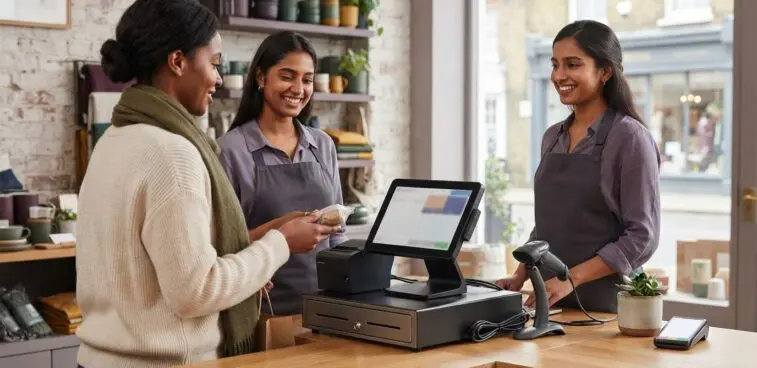
The best HP Engage One POS alternative may not be another all-in-one terminal. The right choice depends on your counter space, the peripherals you need to retain and how the till connects to the rest of your operation. When comparing HP Engage One POS alternatives, weigh these practical requirements alongside industry fit, affordability and long-term value.
A familiar, compact counter setup can be appealing, particularly when staff already rely on connected receipt printers, cash drawers or scanners. But a replacement that looks similar may not suit your existing equipment or your team’s workflow. Compatibility, connection options and the demands of a busy retail environment all shape the decision.
This guide explains how to compare POS formats, assess peripheral and connectivity needs, and weigh purchase considerations against operational value. It also considers how different setups can serve retail, hospitality, pharmacy and leisure settings, helping you build a shortlist before choosing the configuration that fits your counter and workflow.
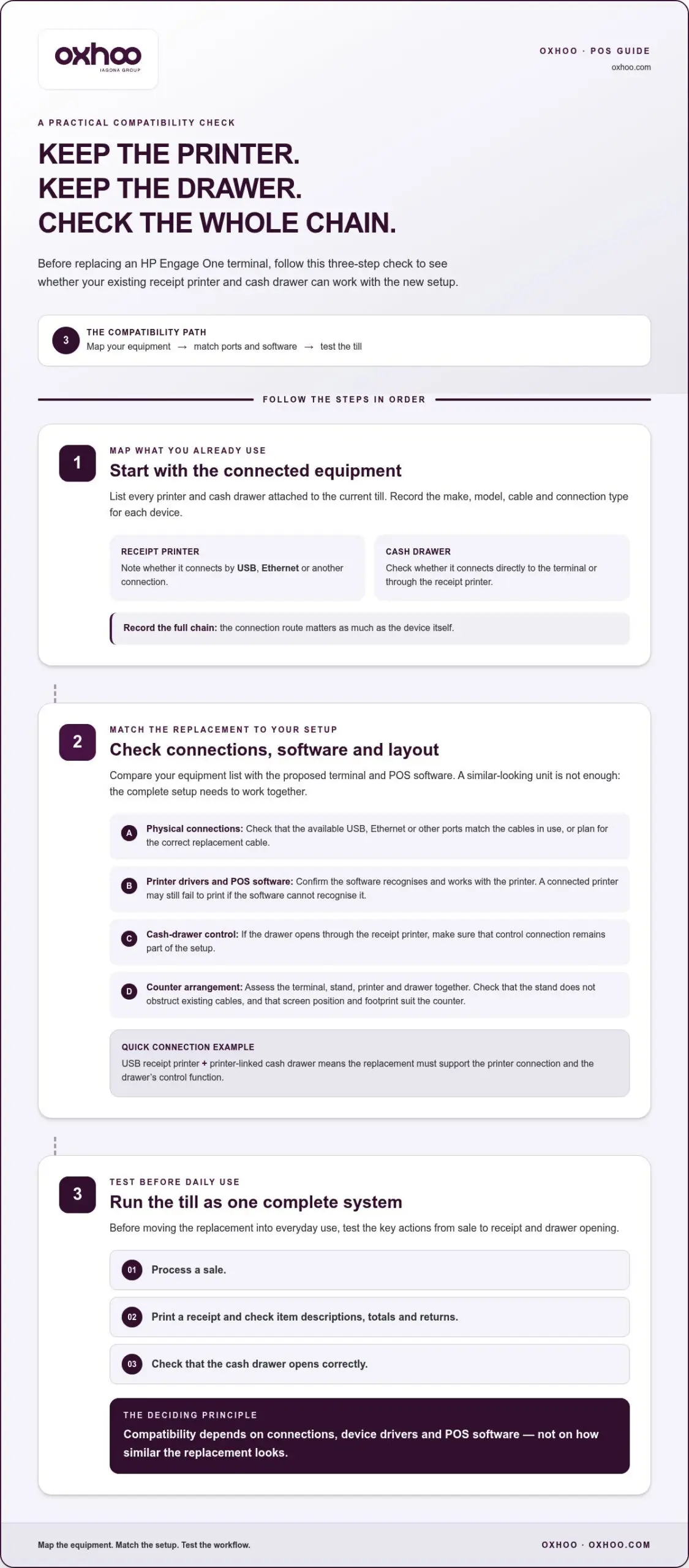
Which HP Engage One alternatives are compatible with common UK POS software and peripherals? Compatibility depends on the terminal’s operating environment, available ports, device drivers and the software’s supported hardware. If your setup uses a USB receipt printer and a printer-linked cash drawer, the alternative must support those connections and control functions.
How do HP Engage One alternatives compare on performance, screen size and design? Match processor capability to the demands of your POS software, then assess screen size against the tasks staff perform at the till. A larger display can help with detailed product searches, while a smaller footprint can preserve space on a narrow counter.
Design also affects cable routing and peripheral access. For example, a stand that positions the screen neatly may still obstruct an existing printer cable. Assess the terminal, stand, printer and drawer as one counter arrangement, rather than judging the screen alone.
How do warranty, support and repair options compare for UK POS systems? Compare the written warranty period, the hardware it covers and the stated repair process. Also review support hours, on-site availability, replacement arrangements and who handles faults involving the terminal, printer or cash drawer.
Before purchase, follow a practical three-step check: map existing connections, match each device to the replacement’s ports and software support, then test a sale, receipt print and drawer opening. This helps reveal compatibility gaps before they disrupt point-of-sale processing.
Retail counters, pharmacy tills and hospitality service points place different demands on a POS system. Compare the working environment, transaction flow and equipment layout before choosing a format.
A clothing shop may prioritise quick product searches, barcode scanning and clear returns processing. A pharmacy may need a screen layout that supports accurate item selection, while a café may value a compact till beside a separate collection point. Each setting affects the balance between computing capacity, screen position and counter space.
Map the staff journey from item selection to payment and receipt. Note where cash drawers, scanners and customer-facing displays sit, then consider whether a fixed terminal or mobile device better supports that flow. For example, staff serving customers across a showroom may benefit from processing sales away from the main counter.
All-in-one POS systems combine core computing and a screen in one counter-mounted unit. Alternatives to the HP Engage One in the UK include this format, as well as modular setups with a separate display and computer. Compare the footprint, screen placement and access to connections against the system’s intended retail workload.
An integrated design can create a cleaner counter, while separate components offer more flexibility in positioning. Neither format suits every business. A small retailer with one checkout may favour an uncluttered till, while a larger shop may need several terminals and distinct customer service points. Compare each setup with the actual workflow.
Industry needs also affect whether fixed or mobile POS is more practical. A fixed terminal can anchor a staffed checkout, with cash drawers and scanners arranged around it. Mobile POS can support queue-side service or sales across a shop floor, provided the software and peripherals suit the operation. Choose based on staff movement, not appearance alone.
Use this comparison sequence to assess shortlisted systems:
For retailers serving customers beyond a fixed checkout, mobile POS solutions can form part of a more flexible counter strategy. The decision remains grounded in the work each till must perform, the space available and the equipment staff use every day.
A POS terminal’s purchase price is only one part of its cost. When replacing an HP Engage One, compare the complete setup: computing hardware, displays, peripherals, installation and ongoing upkeep. A lower initial outlay may not be the least costly option if it requires new scanners, printers or cash drawers.
Start by listing the equipment each checkout needs. A clothing retailer, for example, might use a terminal, barcode scanner, receipt printer and cash drawer. Record which accessories can remain, which need replacing, and whether the new system supports the same transaction flow. This inventory makes proposals easier to compare.
Separate essential costs from optional additions. A second customer-facing display may improve till visibility, but it also adds hardware and takes up counter space. Assess security features in practical terms too: compare how each proposed setup secures the terminal and connected equipment within your shop layout.
Assess return on investment over a defined period using real operating records. Compare each option’s full cost with measurable business benefits, such as less manual entry or faster stock look-ups. For example, if a scanner-connected setup reduces repeated product searches, estimate the staff time saved from your own till observations.
Use this calculation structure rather than relying on a headline saving:
Keep assumptions visible. If a proposal includes a new display but your existing screen already supports the required work, assess that addition separately. If keeping a scanner depends on software compatibility, include replacement as a possible cost rather than assuming it can be reused.
Finally, compare each configuration with your transaction volume, inventory process and counter layout. A single-shop retailer may value a simpler setup, while a multi-till operation may prioritise consistent equipment and easier stock handling. The strongest financial case is the system that meets operational needs without unnecessary hardware or avoidable disruption.
A POS terminal connects more than a screen to a till. Its ports and network options determine how you link barcode scanners, receipt printers and back-office systems. Assess the full connection layout, including power, network access and each device’s position on the counter.
Port availability matters when you add equipment. A barcode scanner, customer display and receipt printer may each need a separate connection. If the terminal has limited ports, a hub can add capacity, but it also adds another component and connection point. Check that the arrangement supports every device without obstructing access or crowding the counter.
Connectivity also matters when employees move between service areas. In a hospitality venue, a fixed terminal might serve the main counter, while mobile devices support orders elsewhere. These setups rely on suitable network coverage and software access. A powerful terminal cannot compensate for a weak connection to the systems processing stock or orders.
Review these areas before selecting a configuration:
Network design can affect POS performance during busy trading. For example, if several tills rely on the same wireless access point, its placement and coverage affect their connection to shared services. A wired link may suit a stationary checkout, while wireless access can better support staff carrying a device around the shop.
Test the proposed setup in its intended position, not just on a desk. Connect the scanner and receipt printer, process a sale and check that the till can reach the systems it needs. Then review cable access, screen visibility and staff movement around the counter.
For a multi-site retailer, document the connection plan for each location. A consistent layout can simplify equipment changes, while differences in network access may call for site-specific arrangements. Comparing ports, network paths and everyday use shows how each alternative will fit into retail or hospitality operations.
UK retailers comparing the HP Engage One can consider integrated EPOS terminals from commercial hardware manufacturers. These systems combine computing and a touchscreen in a counter-based unit, but vary in footprint, peripheral support and configuration. Compare the complete till setup, not just the screen.
There isn’t one universal replacement. The best match depends on whether you prioritise a compact checkout, an established peripheral setup or a more adaptable workstation. A retailer with limited counter space may prefer an integrated design, while a busy service desk may need broader connection options and easier access to attached equipment.
Use these system types to organise a shortlist:
For each candidate, check that its operating environment works with the POS software already used in your shop. Software compatibility affects access to product records, transaction processing and reporting. A terminal’s appearance or touchscreen alone cannot show whether it will support your existing workflow.
Next, compare the physical configuration. Review screen position, stand design, cable routing and space for a receipt printer or cash drawer. For example, a display that fits neatly beside the till may leave too little room to handle packaging or returns. Assessing the counter in practice can reveal these trade-offs before selection.
Give peripheral compatibility equal weight. Identify the receipt printer, scanner and payment device connected to your current system. Compare their connections and software support with each proposed terminal, then test key tasks: product lookup, sale completion, receipt printing and returns. This keeps the comparison grounded in daily retail work.
Finally, assess each system against the site’s needs. A single checkout may favour a simple, integrated design, while several tills may call for consistent configurations across the shop. Record operational priorities, compare shortlisted terminals against them, and rule out options that require unnecessary changes to the counter or established processes.
The alternatives outlined are integrated all-in-one terminals, modular counter systems and compact commercial terminals. The best fit depends on counter space, peripheral needs and workstation configuration.
A suitable alternative needs an operating environment that works with your POS software, as well as connections and software support for your receipt printer, scanner and payment device. Check these requirements against each candidate and test everyday tasks such as sales, receipt printing and returns.
OXHOO’s POS Terminals offer UK retailers a commercial hardware option when replacing an HP Engage One or planning a new checkout. Each terminal is built for continuous all-day operation and backed by a 5-year warranty with next-day on-site support.
These formats can suit retailers seeking a dedicated counter terminal for daily transactions and a refined, professional presentation. For broader service needs, OXHOO also offers self-service kiosks, digital signage and digital menu solutions, so businesses can consider customer-facing hardware alongside checkout equipment.
If you’re assessing POS hardware for your retail environment, contact OXHOO to discuss your requirements.
Choosing among HP Engage One POS alternatives is an opportunity to plan beyond a like-for-like terminal swap. Consider how checkout hardware can support your retail environment, from the staffed counter to customer self-service and in-store communications. A considered configuration can bring these touchpoints together in a coherent physical experience.
OXHOO offers POS terminals for checkout environments, self-service kiosks for customer self-service, and digital signage for in-store communication. These options give retailers a starting point for considering how counter equipment and customer-facing technology can work together. The right direction depends on your space, operating model and customer journey priorities.
Set out the outcome you want from your next setup, whether that means refining the till area or exploring additional customer touchpoints. Contact OXHOO about your POS needs and take the next step towards a retail environment designed around your operation.
Requirements vary by terminal, so match the proposed unit’s power supply, ports and mounting arrangement to your checkout. For example, identify the available power socket, network connection and space beneath the counter before selecting a stand. Record attached devices and cable routes too. This helps you determine whether the terminal can sit securely, connect neatly and reach the peripherals staff need for everyday service.
Yes, different POS formats can suit retail, hospitality and self-service when matched to the task. A staffed shop checkout needs a terminal suited to product selection and sales, while a restaurant may prioritise order entry at service points. Self-service calls for kiosk hardware designed for customer interaction. In every setting, the software, peripherals and physical layout must support the intended workflow.
UK businesses assessing HP Engage One POS alternatives should start with the required checkout tasks, then map existing equipment and software dependencies. Include product lookup, refunds, stock access and end-of-day routines. Plan how staff will learn any changed interface, and schedule the changeover around trading needs. Testing representative products and transactions can reveal workflow issues before deployment.
Compatibility depends on the alternative’s operating environment, available ports, device drivers and the POS software’s supported hardware. Check that it supports the connections and control functions your receipt printer and cash drawer require.