

What if replacing an ageing POS terminal isn’t the right first move? You don’t always need to replace outdated POS terminals: a card machine may be worth keeping if it remains reliable and works with the way you take payments. Most POS terminals have a practical lifespan of 5–7 years under normal retail conditions, but recurring faults, slow checkouts or technology that no longer meets your needs matter more than age alone.
It’s understandable to hesitate before replacing equipment that still processes payments. The decision depends on whether the card machine itself is causing problems, whether it can continue working alongside updated EPOS hardware, and what a wider upgrade would involve. A like-for-like terminal replacement is different from replacing a complete EPOS setup, so assess the equipment and system scope separately.
This guide explains when to repair, retain or replace a terminal, how to assess compatibility, and which factors shape the cost of an EPOS upgrade in the UK. You’ll be able to weigh reliability against the cost and disruption of a broader change, then decide what to replace.
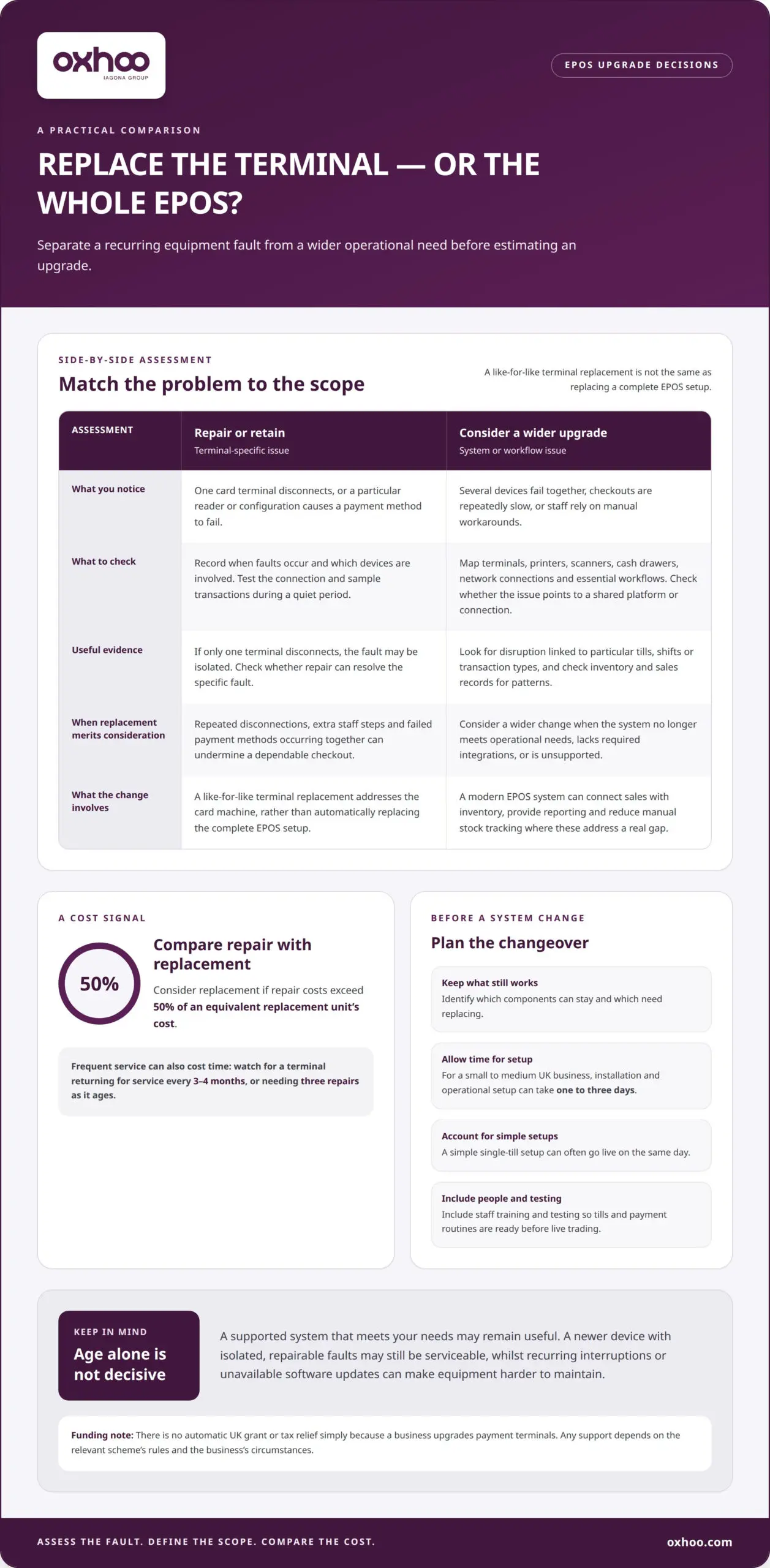
A slow checkout can point to an ageing POS interface, a weak connection or a fault between the till and card machine. If staff must tap through several screens to complete a sale, for example, every customer in the queue may wait longer. A card terminal that disconnects during a busy period creates a separate problem: staff may need to reconnect it or retry a payment. Record when faults occur and which devices are involved. Patterns can help distinguish a terminal issue from a wider platform or network problem.
Observe the entire payment journey, from selecting items to receiving approval. Note whether the till slows before the card machine starts or the delay begins during payment authorisation. Then test the connection and run sample transactions during a quiet period. If only one terminal disconnects, the fault may be isolated; if several devices fail together, the connection or shared platform may be involved. Check inventory and sales records for disruption linked to particular tills, shifts or transaction types.
Contactless payments can shorten checkout, but the terminal still needs to read and authorise each tap reliably. A modern POS setup may support mobile wallets such as Apple Pay and Google Pay alongside contactless cards. Test each accepted payment method on the equipment in use. If contactless fails while chip-and-PIN payments work, the issue may lie with the reader or its configuration, rather than requiring replacement of the whole POS setup.
For split bills, the till and payment terminal need to process more than one payment against a single sale. In a restaurant, for example, a table total might be divided between two cards, with each share settled and no balance left unpaid. Check that the recorded sale and payments match when the transaction is complete. Also distinguish payment tenders, such as card and cash, from authorisation: the tender records how the customer pays, while authorisation confirms whether a card payment is approved. For merchants looking to optimise costs across different tender types, processors like Renegade Payments offer structures such as dual pricing to help manage transaction fees.
For UK payment security, assess whether the terminal and payment setup align with EMV and PCI DSS requirements. PCI DSS concerns the secure handling of payment card data; the relevant controls depend on how your business accepts and processes payments.
There is no automatic UK grant or tax relief simply because a business upgrades its payment terminals. Any support depends on the rules of the relevant scheme and the business’s circumstances, so consider funding and tax treatment separately from the equipment decision.
Consider replacement when repeated disconnections, extra staff steps and failed payment methods occur together. A POS terminal or card reader may typically last 4–6 years, while POS terminals and tablets typically last 3–5 years. Age alone is not decisive: a newer device with isolated, repairable faults may remain serviceable, while a terminal that repeatedly interrupts checkout may no longer support a dependable workflow.
The impact of outdated equipment reaches beyond the till. If staff repeatedly restart a frozen checkout or manually record stock changes, customers wait and operational details can be missed. A traditional cash register records transactions, but inventory and reporting may require separate processes. An EPOS system can connect sales with inventory levels, helping keep stock records aligned as items sell.
Look for a recurring pattern rather than judging a system by one fault. A terminal returning for service every 3–4 months, or needing three repairs as it ages, may be costing time as well as repair fees. Increasing faults in printers, cash drawers, touchscreens or barcode scanners can also make a system unreliable. When estimating replacement, consider it if repair costs exceed 50% of an equivalent replacement unit’s cost.
Support matters as much as age. If software updates are no longer available, the system can carry security risks and become harder to maintain. Older equipment may also lack the integrations or functions your operations need. For example, manually transferring sales figures into spreadsheets to plan stock adds work and can introduce errors. A supported system that meets your needs may remain useful, while an unsupported one can become unsuitable sooner.
A modern EPOS upgrade can coordinate checkout, sales reporting and stock information. Reports on hourly performance, top sellers and comparisons can help owners plan stock, schedule staff and adjust pricing. Automatic inventory updates with each sale can reduce manual tracking. These benefits matter when they address a real operational gap, not simply because equipment is being replaced.
Before switching, map the current setup: terminals, printers, scanners, cash drawers, network connections and essential workflows. Identify which components can stay and which need replacing. Include staff training and testing in the changeover plan so tills and payment routines are ready before live trading. For a small to medium UK business, installation and operational setup can take one to three days; a simple single-till setup can often go live on the same day.
Costs depend on the scope of the upgrade, including the number of terminals, required peripherals and software arrangements. Separate the cost of fixing a specific fault from the wider value of reliable operations, clearer reporting and reduced manual work. Where a replacement is justified, exploring a planned EPOS hardware upgrade can help frame the decision around the equipment and workflow the business needs.
A POS system should fit the wider flow of transactions, not operate as an isolated till. For example, an in-store sale can update inventory, while a connected accounting tool can receive sales information for reconciliation. Without an integration, staff may need to re-enter totals, increasing repetitive work and the risk of errors. Map the information that moves between platforms before deciding whether an older system still supports your operations.
Stock and menu costing show why these connections matter. In a restaurant, linking sales activity with inventory can help managers monitor ingredient use, identify waste and plan purchasing. Menu-costing information can also highlight where ingredient costs and sales patterns need attention. If staff compare sales reports with stock sheets by hand, identify which records could connect, how often they need updating and who uses the information.
Cloud back-office tools can bring sales and operational information together for review away from the till. For businesses managing multi-system environments, specialist IT providers like ManagePoint help support secure cloud setups and reliable data flow across platforms. An accounting integration can reduce repeated entry of transaction totals, while a connected ecommerce platform can help align online and in-store activity. Check whether systems exchange the required information, such as sales and stock changes, without creating duplicate records. POS systems vary in their integrations, so specify the connections your business needs before upgrading.
Online ordering and delivery add another workflow. A restaurant may receive orders through its own online channel and need those transactions reflected in sales and stock records. If orders come through a separate process, staff may have to re-enter items or reconcile totals later. Map how an order moves from customer selection to fulfilment, payment and reporting. This shows where an integration could simplify work and where a manual handover remains.
Restaurant systems can also connect POS activity with loyalty, reservations, delivery and kitchen operations. A loyalty transaction needs to associate customer activity with the correct sale, while a kitchen system needs to deliver the order details staff must prepare. Connections should provide each team with the information it needs without adding unnecessary checkout steps. List essential tools and their purpose, then separate operational requirements from optional features.
Before changing platforms, document current data flows and the records that must remain usable. Include product and menu details, sales history, stock information, customer records and accounting summaries. Test representative transactions, such as an in-store sale, an online order, a stock adjustment and a loyalty redemption. Confirm that each record appears in the intended system and staff can complete the workflow. This gives you a practical basis for judging whether the current platform can support the next stage of growth.
Growth changes what a POS needs to handle. A single retail counter may expand to several tills, while a hospitality venue may add a site, menu or service channel. Assess the system against the business’s next operational needs: more terminals, easier-to-use hardware, added functions and consistent reporting. If every new location requires separate workarounds, the platform may be limiting expansion instead of supporting it.
Manufacturer support and parts availability are practical measures of future resilience. POS terminals that are 6+ years old may be vulnerable when the manufacturer has discontinued the platform and parts availability is shrinking. A failed screen or unavailable component can then leave a working setup difficult to restore. Older systems can also become harder to repair when replacement parts are no longer available. Review the fault history alongside whether the hardware can still be maintained.
For multi-location retail or hospitality operations, consider how managers will oversee both shared standards and local differences. A suitable system can support centralised management, location-level reporting, shared menus and permission controls. A hospitality group, for example, may need to update a menu across sites while reviewing sales by location. A retailer may need consistent product information and branch-level performance reports. These requirements help determine whether an integrated platform can grow with the organisation.
Updates matter, too. If the system no longer receives software updates or cannot accommodate new features, the business may struggle to adapt its workflow. List planned changes, such as opening another site, adding product ranges or adjusting staff roles. Compare them with the current POS capabilities. A system that works today may still be unsuitable if it cannot support those changes smoothly.
Technical support is another part of long-term suitability. Establish how to report faults, what information support teams need and how the business can continue taking sales during a disruption. A clear process might identify the affected terminal, record the fault and direct staff to another functioning till where available. Make sure staff know where operating instructions and system details are kept, rather than relying on one person’s memory.
Use a short growth assessment before deciding whether to retain or replace equipment:
If several answers point to limitations, a planned refresh may be more practical than extending a platform that cannot support the next stage of growth.
EPOS upgrade costs depend on the equipment and functions included, not just the number of tills. One checkout with a terminal and receipt printer has a different scope from several tills with scanners, cash drawers and connected displays. Software arrangements, installation and product-data preparation can also affect the overall budget. List these elements separately before comparing proposals, so the total reflects the setup your business needs.
Hardware is the physical layer: terminals, screens and any required peripherals. Start with a list of existing devices, then mark each as retain, replace or add. For example, a shop replacing one unreliable terminal may have a smaller equipment scope than a retailer fitting out several lanes. A 20-lane retailer faces a broader capital expenditure decision, because the number of workstations and supporting devices shapes the project.
Software is a separate cost category. It may cover the EPOS platform and functions such as stock management, reporting or ecommerce connections. Distinguish one-off project costs from recurring software fees and ongoing support charges. Then identify essential functions: a retailer needing inventory records has different requirements from a café focused on menus and order handling. Avoid paying for features that do not support a real workflow.
To compare fees, features and contract terms, use the same specification for each proposal. Compare the complete hardware list, software functions, recurring charges, contract length, renewal and cancellation terms, and included support. A lower initial figure may not reflect the full cost if required peripherals or functions are outside the quoted scope.
Build a like-for-like estimate in stages. First, count the terminals and peripherals needed at each checkout. Next, list the software functions and integrations required for stock, reporting or online orders. Finally, separate installation, data preparation, training and ongoing charges. This breakdown can show whether a targeted replacement is enough or a wider platform change would better address repeated freezes, transaction errors and manual workarounds.
For a business with several tills, estimate costs by checkout rather than relying on one headline total. Include any additional device needed for a specific workflow, such as scanning products or printing receipts. Check that the proposed software can handle processes that currently cause errors, then assess the preparation staff will need before switching. These details make the estimate useful for planning operations, not just approving a purchase.
The clearest takeaway is to compare complete configurations, separating hardware, software and project costs. To scope the physical equipment required for your setup, discuss your POS terminal requirements.
OXHOO supplies commercial POS terminals for UK retailers, hospitality venues, pharmacies and leisure operators. If your current equipment is slowing checkouts, limiting a planned expansion or becoming difficult to maintain, a new terminal can provide a considered hardware refresh. Each terminal is built for continuous all-day operation and backed by a 5-year warranty with next-day on-site support.
For businesses reviewing a wider customer-facing setup, OXHOO also supplies self-service kiosks, digital signage and digital menu boards. These options can meet different service and presentation needs alongside POS hardware, but they are not essential to replacing a terminal.
To discuss POS terminals for your business, contact OXHOO.
Replacing outdated POS terminals is also an opportunity to improve how customers move through your business. Decide whether the next setup should simply refresh a checkout point or support a broader change in how customers browse, order and pay. A retailer may prioritise a refined till area, while a busy venue may consider adding self-service options.
OXHOO supplies POS terminals, self-service kiosks and digital signage, giving businesses options for customer-facing areas as part of a wider setup. The right scope depends on your operations, available space and the experience you want to create. A phased plan keeps the decision focused on practical needs rather than replacing equipment without a clear purpose.
When you’re ready to discuss the next step, contact OXHOO about your POS. A considered upgrade can give your team a more coherent foundation for the service ahead.
You can keep the existing card machine if it remains reliable and works with the till and payment setup you plan to use. Before changing hardware, run a test transaction and confirm the sale appears correctly in the till records. If the machine disconnects, cannot handle a required payment method or adds steps for staff, replacing outdated POS terminals may be part of a wider review.
There is no standard total: the scope depends on the terminals, peripherals and functions required. A useful estimate separates hardware from software, installation, data preparation and staff training. Replacing one till is a different project from equipping several checkout points and connecting inventory or online orders. Compare proposals against the same equipment list and required functions, then review recurring charges and contract terms separately.
POS equipment has no single lifespan because terminals, card readers and peripherals age differently. Most POS terminals have a practical lifespan of 5–7 years under normal retail conditions, while terminals and tablets typically last 3–5 years. High-traffic stores and busy kitchens can shorten equipment life. Treat age as a planning guide, then weigh support, parts availability, operating conditions and the frequency of faults.
For a small to medium UK business, installing and setting up a new EPOS system can take one to three days; a simple single-till setup can often go live on the same day. Allow time to load product details, test representative sales and prepare staff. A one-hour training session before go-live can familiarise the team with core tasks, including processing a sale and correcting an entry.
Age alone doesn’t make a terminal too old. A supported system that still meets operational needs may remain suitable, while an unsupported device can become a concern much sooner. POS terminals that are 6+ years old may face shrinking parts availability if the manufacturer has discontinued the platform. Consider whether repairs are practical, updates continue and the system still accepts the tenders your business needs.
A system may be outdated if essential tasks depend on workarounds or it no longer fits your trading needs. Look for repeated freezing, staff re-entering sales information, missing integrations and reports that cannot answer routine questions. Difficulty transferring records during a planned change is another warning sign. Before migration, preserve usable copies of product details, sales history and customer data, with CSV as a minimum export format.
Start by defining what the next stage of trading requires: additional checkout points, easier staff workflows, mobile selling or customer self-service. A retailer expanding its floor space may need a different layout from a hospitality venue handling orders across a larger service area. Match the equipment plan to these practical changes rather than choosing features without a clear purpose. That gives the upgrade a defined role and useful scope.
Consider replacing equipment when faults become frequent, essential functions are missing or the system cannot support planned changes. A till that repeatedly needs restarting during trading causes disruption, while unsupported software can make the setup harder to maintain. Compare the cost and practicality of repair with the value of a suitable replacement. If only one component is at fault, a targeted repair may be enough.