


A touchscreen alone does not make a till more capable. The difference comes from the POS system behind it. Unlike a basic cash register, a POS system can track inventory, report sales, provide real-time data, accept different payment types and integrate with other business systems. So, an Elo Touch vs commercial retail tills comparison is about the complete checkout setup, not just the screen.
A traditional cash register may be enough for a straightforward checkout, while a POS system can connect sales with wider store operations. The right option depends on what your team needs to manage at the counter and across the business.
This guide compares touchscreen hardware and commercial retail tills, explains how POS capabilities shape daily workflows, and outlines what to consider for a UK retail setup. You can assess practical differences, from touch interaction to reporting and integration, before choosing what best fits your operation.
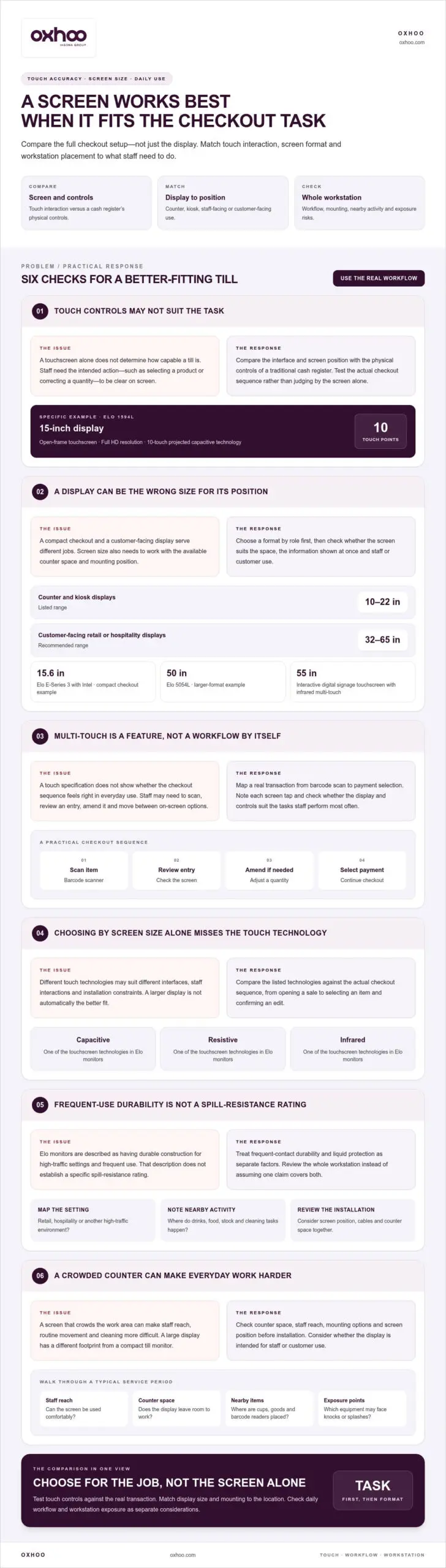
Map a real transaction from barcode scan to payment selection, noting every screen tap. This shows whether the touch controls, display size and position suit the workflow. A mobile checkout may need a different screen arrangement from a fixed counter, so compare the intended location and tasks rather than treating all retail tills as alike.
A separate option is a 55-inch Elo interactive digital signage touchscreen with infrared multi-touch. Its larger format and touch capability make it a distinct consideration from compact checkout displays. Consider whether the intended setting calls for an interactive signage screen rather than a staff-facing till monitor, and check how its touch interaction fits the tasks expected of users. This keeps the choice tied to use and placement, rather than treating multi-touch as a specification in isolation.
Retail equipment handles repeated contact, frequent use and busy service periods. Elo touchscreen monitors are described as having durable construction for high-traffic settings and frequent use. That matters at counters where staff tap the same screen throughout a shift, but it does not establish a specific spill-resistance rating. Durability and liquid protection are separate factors when comparing a touchscreen computer with a traditional till.
In hospitality, a till may be near drink preparation, food service or customer handovers. A drink spilled beside a monitor creates a different risk from routine tapping, so assess the whole workstation. Check where the screen, cables and connected equipment sit in relation to liquids. A thoughtful layout can keep checkout flowing without placing vulnerable components beside spill-prone tasks.
Touchscreen format also affects everyday care. A large display, such as the 50-inch Elo 5054L, has a different footprint from a compact till monitor. Consider the surrounding counter space, staff reach and the screen’s position before installation. A display that crowds the work area can make cleaning and routine movement harder, whilst a carefully positioned screen keeps the service surface organised.
For a practical assessment, walk through a typical service period. Note where staff place cups, packaged goods, barcode readers and cleaning materials, then identify which equipment is exposed to knocks or splashes. This helps distinguish frequent-use durability from protection against liquid ingress, without assuming one includes the other.
These checks let you compare a touchscreen range with a conventional till based on operating conditions, not appearance alone. Match equipment placement and handling practices to the checkout environment. For example, a hospitality counter near drink service needs a different layout review from a dry retail payment point. The key question is how the full installation manages frequent contact and exposure risks.
For a retail setup where durability and screen placement matter, explore commercial POS terminals as one part of the equipment comparison. Assess the intended counter layout, daily workflow and cleaning routine together. That keeps the choice grounded in the demands of the site, rather than treating “commercial-grade” as a substitute for checking each practical requirement.
Elo’s range includes compact POS systems, standalone touchscreen monitors and larger interactive displays. This matters because a till setup may serve counter staff, customers at a kiosk or visitors at a self-service point. First match the device format to its role, then compare screen size, mounting and computing requirements.
For an integrated checkout, the EloPOS Z30 with Intel pairs a 15.6-inch Full HD touchscreen with a POS format. The Elo E-Series 2 is a 15-inch all-in-one POS touchscreen, whilst the I-Series 3 Slate POS Fixed Tablet is listed at 15.6 inches. These models illustrate how an all-in-one computer can consolidate the screen and computing unit, rather than treating the display as a separate monitor.
Other configurations address different environments. The Elo Pay integrated payment POS terminal solution is listed as a 22-inch model. A separate 24-inch Elo touchscreen monitor offers Full HD resolution and 10-touch projected capacitive technology. Large displays extend the range beyond the till itself: Elo’s 5554L is a 55-inch wide 4K UHD LCD monitor, suited to a customer-facing display role rather than a compact checkout position.
Choosing between Android and Windows means considering the wider system. Both operating systems can be reliable. Android is often favoured for stability and fast updates in cloud-based environments, while Windows supports long-term reliability for complex enterprise integrations. The decision depends on the software and business systems the device must work with, not just its screen design.
These distinctions help separate a POS computer from a monitor that needs another system to perform checkout tasks. A 55-inch 4K display, for example, serves a different purpose from a fixed tablet at the till. Treat each unit as part of a modular environment, checking its role, operating system and mounting position together. This keeps the comparison focused on practical use, reliability and customer engagement, rather than screen size alone.
To build a useful shortlist, define the device’s main task, required operating system and installation position. Then assess the relevant Elo series against those criteria. This makes it easier to decide whether an integrated POS, standalone touchscreen monitor or larger display suits the retail environment.
UK retail tills should support accurate transaction records, secure payment-data handling and an accessible checkout journey. Plan the setup around how your business records sales, accepts card payments and helps customers complete purchases. A touchscreen alone does not establish compliance.
In retail, Elo touchscreens can serve as checkout displays, interactive kiosks and customer information points. A self-service POS kiosk can support self-ordering, information services or endless-aisle shopping. For example, customers can browse products beyond the stock displayed in store. These uses extend a till’s role from processing sales to supporting customer engagement.
Mobile POS terminals let staff manage inventory and fulfil mobile orders while serving customers away from a fixed till. This can suit a shop floor where a counter-based checkout does not fit every interaction. Start with the task: mobile devices support staff on the move, while a fixed touchscreen creates a defined checkout point.
Hospitality uses include self-service check-in and information stations. A guest-facing display can show directions or guide visitors through check-in, while a staffed till remains available for more involved requests. Decide whether the application is self-service, staff-led or shared, then plan screen placement and customer flow accordingly.
Healthcare provides a further example. A 22-inch Elo healthcare-grade touch monitor is designed for patient check-in and access to electronic health records. Elo touchscreen monitors are also used in healthcare settings, where displays are described as easy to clean and durable. Those characteristics matter in a setting with repeated use and regular cleaning, but the application still determines how the screen is positioned and operated.
Elo touchscreens also support corporate uses, including conference-room solutions. Here, the screen serves a different purpose from a retail POS, supporting interaction in a shared meeting space rather than a payment sequence. Comparing the task, user and location helps specify hardware across retail, hospitality, healthcare and corporate environments.
For each application, trace the customer or staff journey from first interaction to completion. A retailer considering a kiosk, for example, can map how a shopper finds information and moves to the next step. This practical review connects the screen’s role to wider operations while keeping customer engagement, accessibility and checkout in view.
Retail tills should record sales accurately, protect payment data and make checkout accessible. Plan how the setup records sales, accepts card payments and supports customers through purchases. A touchscreen alone does not ensure compliance.
A POS system combines hardware and software to process payments, track sales and inventory, and store transaction data. Costs depend on equipment, functionality and business size; software subscriptions and payment processing fees may add ongoing expenses. Compare the complete setup, not just the touchscreen computer. An attractive display does not show the full cost of running the platform.
Separate one-off hardware costs from recurring service costs. Hardware may include the till, display and connected equipment required for checkout. Software supports sales records, inventory and reporting, while payment processing fees relate to transactions. Map each requirement to its cost category before comparing POS systems.
The scale of the system affects the comparison. Mobile POS systems generally cost less than multi-location or enterprise POS solutions. A retailer equipping staff to serve customers away from a fixed counter has different needs from a business coordinating tills across several sites. Compare the complete operational setup, including the number of locations and workflows it must support.
Features also affect the investment. A basic sales workflow differs from a platform that tracks inventory in real time, provides reporting and integrates with other business systems. Assess each function against a real task. If staff need to check stock during checkout, inventory access is an operational requirement, not a display feature.
Digital displays are a separate consideration when customer engagement is part of the project. A till screen processes transactions; a customer-facing display can communicate menus, promotions or information. Include that purpose in the equipment plan and assess it alongside checkout needs. This avoids treating every screen as interchangeable or overlooking functions beyond payment.
Build a comparison by recording the required equipment, software capabilities, payment arrangements and operating scale. Then distinguish initial hardware spend from recurring charges, so each option is assessed on its full role. To plan display requirements alongside checkout hardware, explore retail technology options.
POS system costs vary with hardware, features and business size, and may include equipment, software subscriptions and payment processing fees. Listed starting prices offer a hardware comparison, but do not represent the full cost of an operating setup.
Compare equipment prices with the software subscription and payment processing fees relevant to your business, so you do not mistake the hardware figure for the total system cost.
OXHOO supplies commercial POS terminals for retailers comparing touchscreen equipment with conventional tills. Each terminal is built for continuous all-day operation and backed by a 5-year warranty with next-day on-site support. For a fixed checkout, this provides a practical hardware option when durability and ongoing operation are central to the decision.
When the customer journey extends beyond the counter, OXHOO also supplies self-service kiosks, digital signage and digital menu solutions. These options can support a connected retail environment, with checkout hardware and customer-facing displays serving different roles. Choose a configuration around your space, workflow and intended customer interactions.
To discuss POS terminals and related retail hardware for your operation, visit OXHOO.
Choosing between Elo Touch and commercial retail tills is a chance to look beyond the immediate transaction. Consider how customers move through your space, where staff need flexibility and how the checkout environment may develop. A well-planned hardware setup can support a consistent experience at the counter and across the store.
OXHOO supplies POS terminals, self-service kiosks and digital signage for checkout, self-service and customer-facing communication. The right combination depends on your layout and the role of each touchpoint. Identify your operational priorities, then explore how OXHOO’s hardware solutions fit your environment.
For a considered next step, contact OXHOO about your POS needs. A clear view of your workflow and space can help shape a setup suited to your business. Move forward with confidence in the direction you choose.
Durability depends on the equipment’s construction and the conditions of daily use; expected lifespan varies with workload, handling and maintenance. Elo touchscreen monitors are designed for high-traffic environments, while a traditional till’s physical controls offer a different interaction style. The client states that every terminal is built for continuous all-day operation and backed by a 5-year warranty with next-day on-site support. Treat warranty coverage and expected working life as separate considerations when planning equipment replacement.