


What makes an all day POS terminal ready for your trading day? It takes more than a robust-looking machine. A terminal can be a poor fit for long opening hours if it doesn’t suit the venue’s workflow, counter space or support arrangements.
Reliability matters when queues are building and service is busy. To compare equipment clearly, distinguish the POS terminal from the payment reader: the POS terminal supports the wider EPOS setup, while the reader handles card payments. They have different roles, and each should suit the way your team serves customers.
This practical checklist covers the qualities to assess for everyday commercial use, how to match terminal requirements to your trading pattern, and how to weigh warranty and maintenance support. OXHOO supplies commercial POS terminals designed for all-day operation in UK retail and hospitality environments, backed by a five-year warranty and next-day on-site maintenance. Matching the hardware and support to your working routine gives you a more considered foundation for a demanding service day.
A commercial all-day POS terminal is hardware selected to support a venue’s usual trading hours, transaction patterns and staff workflow. The term does not promise uninterrupted uptime. A terminal may be used throughout a long shift without being intended to operate continuously, day and night. Judge suitability by how well the equipment and its support match the service your business runs.
Start by mapping the trading day. A shop with extended opening hours may see a steady flow of transactions, while a café or restaurant may have sharper peaks around meal times. The same terminal could suit either setting, but placement, staff movement and support needs may differ. Check that staff can reach and use the equipment comfortably, and that it fits the counter or service area without obstructing the work.
Think of the setup as a working point-of-sale environment, rather than a single device in isolation. An overview of point of sale terminal systems illustrates how POS configurations bring together equipment and service functions. For long daily use, the practical question is how the terminal fits your normal operations, not whether it can be treated as a universal, always-on solution.
Consider opening and closing times, the usual transaction flow and when service gets busiest. A retailer with a constant stream of customers may need a different counter arrangement from a hospitality team handling concentrated order and payment periods. Each pattern puts different demands on staff movement, equipment access and the timing of transactions.
A long trading day is not the same as round-the-clock operation. Write down the hours the terminal will be used and identify the busiest periods. This gives you a practical basis for assessing suitability and avoids comparing equipment against requirements that don’t reflect your business.
A POS or EPOS terminal supports the wider point-of-sale workflow. Depending on the setup, it can include the staff-facing system used to manage a sale. A payment terminal is the device used to take a card payment. The two may be connected parts of one checkout, but they perform distinct roles.
Keeping those roles clear makes comparisons more meaningful. A payment reader’s functions don’t describe the capability or suitability of the EPOS terminal, and a POS terminal isn’t itself a payment-processing service. Assess each component according to its role in the venue’s workflow, then consider how the complete arrangement supports a normal trading day.
Dependable daily operation starts with fit. The terminal should sit naturally within the workspace, be practical for staff to use throughout their shift and support the sequence of tasks from service to checkout. A smart design can be valuable, but it also needs to work with the counter layout and pace of the venue.
Let your trading conditions guide the hardware checks. Longer opening hours, concentrated service peaks, frequent staff interaction and limited counter space each affect what to prioritise. For an all day POS terminal, assess the actual environment and routine rather than assuming a particular feature or specification is essential for every business.
Measure the available counter space and consider how staff move around it. Check that the screen and connected equipment are within reach without obstructing service. Think about how the terminal will be used during a typical shift, where cables and accessories can sit, and whether the setup leaves room for customers and colleagues to share the service area comfortably.
Review the workspace during a busy period, not just when it’s quiet. A position that looks tidy before service may become awkward if staff have to reach across one another or work around a queue. Consider access for routine cleaning and maintenance, and follow the equipment’s care guidance. The aim is a stable, practical arrangement that fits the way the venue operates every day.
Map the steps from staff input to checkout and payment handover. Note where information is entered, where a customer interacts with the equipment, and whether staff need to turn, reach or move between devices. A consistent layout makes the routine easier to learn and repeat, particularly when several team members use the same station.
Choose peripherals to support the workflow, not the other way round. A touchscreen may suit direct staff input; a scanner may be relevant where items need to be identified quickly; a printer may be needed if the setup relies on printed receipts or orders. Treat these as considerations for the complete arrangement, rather than assuming every terminal requires or includes them.
Include support for the hardware in your operational planning. OXHOO supplies commercial POS terminals designed for demanding, all-day operation, with a five-year warranty and next-day on-site maintenance. Explore OXHOO commercial POS terminals as a hardware option for retail and hospitality environments.
The right format depends on where service happens and how staff move through it. A fixed counter can suit repeat checkout tasks, while a mobile setup may work better when service takes place across several points. For an all day POS terminal, start with your venue’s trading pattern and choose the arrangement that supports the team’s daily work.
Use the comparison below to frame the decision. The support priorities are operational considerations, not a guarantee that a particular setup will prevent disruption.
At a retail counter, check how the terminal fits the queue and the available counter space. Staff may repeat similar checkout tasks throughout the day, so a stable position and consistent access to controls can make the station easier to use across shifts. Keep the customer handover area clear, and arrange connected equipment without crowding the workspace.
High-throughput service is not simply a matter of choosing the fastest-looking device. Assess whether the layout supports the venue’s actual sequence of work, especially during its busiest periods. A compact counter may need a different arrangement from a spacious checkout area.
Hospitality teams may work between a counter, service area or collection point, depending on how the venue operates. A fixed terminal can suit a defined service station; mobile POS hardware may suit workflows where staff need to move between service points. The deciding factor is whether the hardware’s format and placement support the team’s movement without adding unnecessary steps.
OXHOO supplies commercial EPOS terminals and mobile POS hardware for UK retail and hospitality environments. To choose between them, consider where transactions happen, who uses the device and how it fits into the wider working layout. Neither format is universally best. The suitable choice is the one aligned with the venue’s daily operation.
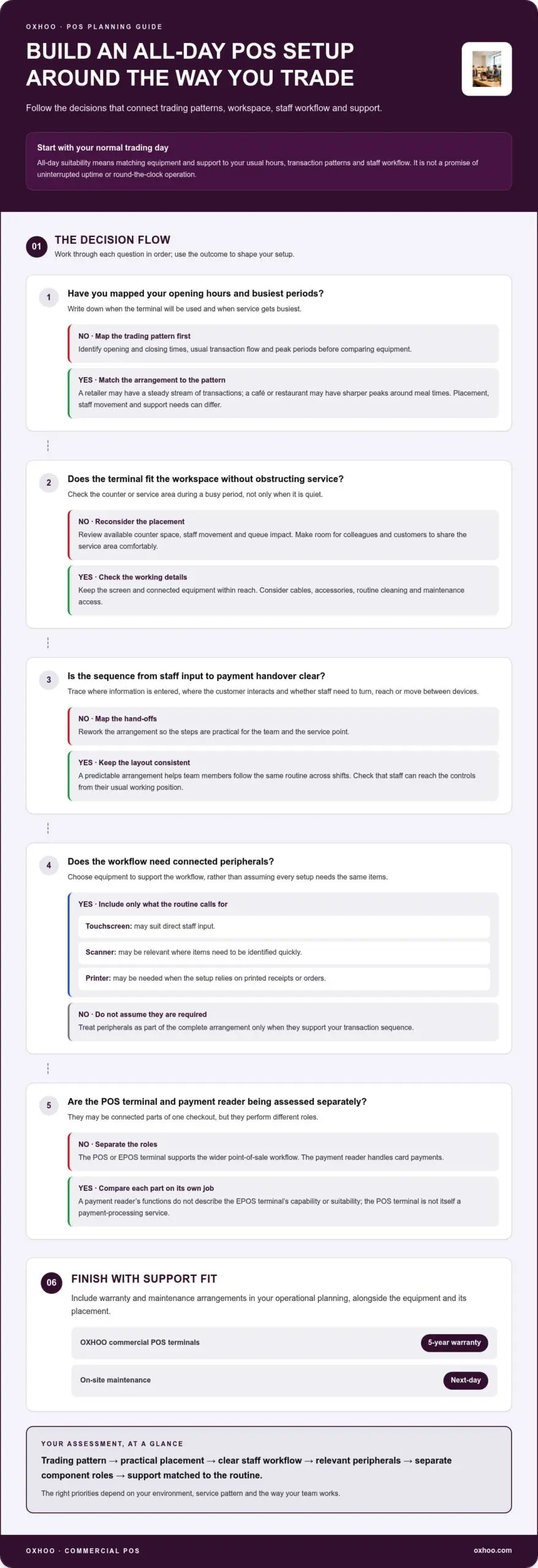
A written checklist turns the idea of an all day POS terminal into clear operating requirements. Record what the device needs to support before comparing options, so essential requirements stay distinct from preferences such as appearance. A shared checklist also gives colleagues a consistent basis for assessing the setup and its support.
Start with your operating pattern, then work through the physical setup and staff routine. Note when service starts and ends, where demand builds, how many points need POS hardware, and whether staff work at a fixed counter or move around. These details make it easier to compare equipment against the venue’s needs rather than a generic product description.
Include support in the written comparison, rather than leaving it until the final decision. Consider how maintenance arrangements fit your trading needs and what support is available if hardware needs attention. A warranty and maintenance support are different: warranty cover is governed by the terms that apply to the hardware, while maintenance concerns the service arrangement for addressing equipment issues. Review each separately so you understand what is included.
OXHOO POS terminals are designed for demanding, all-day operation and are supported by a five-year warranty and next-day on-site maintenance. Include these details alongside your operational requirements, without treating them as a promise of uninterrupted uptime. Explore OXHOO’s commercial POS hardware as you compare options for your venue.
Once you’ve defined your trading pattern, workspace and support priorities, compare commercial hardware against your venue’s needs. OXHOO supplies POS terminals for UK retail and hospitality environments, designed for demanding, all-day operation. This makes its hardware relevant for businesses looking for an all day POS terminal that fits a full trading day, rather than a consumer device selected without regard to the working environment.
All-day suitability depends on how a terminal fits into everyday service. A retail counter may need a consistent working position for repeated checkout tasks, while a hospitality venue may organise service points around different staff routines. OXHOO’s commercial EPOS hardware is designed for these demanding settings, where practical operation and a considered physical presence both matter.
Design is part of that fit. A terminal needs to work within its surroundings and support the way staff use the service point, without drawing attention away from the customer experience. Don’t compare on appearance alone. Check whether the hardware aligns with the workflow, placement and trading hours in your checklist. Those requirements vary between venues, so there is no single configuration that suits every business.
OXHOO also supplies mobile POS hardware. For businesses where staff work across service locations, a mobile format may suit the layout and movement of the team. A fixed terminal may be more appropriate where transactions happen at a defined counter. In either case, let the operational pattern guide the decision rather than assuming one format is inherently better.
Hardware selection is only one part of planning for a long trading day. Include support arrangements in your comparison so you understand the reassurance associated with the equipment over time. OXHOO hardware is supported by a five-year warranty, and OXHOO provides next-day on-site maintenance.
Keep these points distinct in your assessment. A warranty describes warranty support for the hardware, while maintenance refers to a service arrangement for addressing equipment needs. The warranty period and maintenance provision are useful decision details, but they are not a guarantee of uninterrupted operation or a substitute for checking whether the setup fits your venue. Consider them alongside your trading hours, service workflow and placement requirements.
For a considered comparison, bring those requirements together: suitable commercial hardware, the right format for the service point and clearly described support. Explore OXHOO POS hardware for retail and hospitality environments.
Turn your operational requirements into a clear basis for choosing. An all day POS terminal should suit the way your team works, the space available and the service experience you want to create. Keep those priorities visible as you compare options, rather than letting a long feature list distract from the essentials.
Think beyond the initial purchase, too. Commercial hardware should fit your environment and work within your daily routine. OXHOO’s five-year warranty and next-day on-site maintenance make support part of the decision alongside the terminal itself. OXHOO designs its commercial terminals for demanding, all-day operation.
Take the next step by exploring hardware in the context of your venue’s needs. Explore OXHOO commercial POS terminals and consider how they could fit your trading environment. A well-matched setup can give your team a more confident foundation for the working day ahead.
No. “All-day” describes suitability for a business’s normal trading pattern, not round-the-clock operation or guaranteed uninterrupted uptime. A shop open for long daytime hours has a different operating schedule from a venue that trades overnight. Plan around the hours the terminal is expected to be in use, including opening and closing routines, and distinguish that schedule from any claim about continuous operation.
Not necessarily. A POS or EPOS terminal supports the wider sales workflow, while a card payment terminal handles payment transactions. If the equipment is connected, identify which device performs each task and what staff should do if one component needs attention. This makes product comparisons clearer, supports staff guidance and avoids treating a checkout system and a payment reader as interchangeable.
That depends on whether the terminal is intended for commercial use and suits the demands of the particular venue. Consider what happens during the busiest period, such as a queue forming at a counter or several staff sharing a service point. OXHOO’s commercial terminals are designed for demanding, all-day operation. Assess a suitable all day POS terminal against your own workflow and operating arrangements.
Follow the operating and support procedures provided for your equipment, and make sure staff know who to notify. A simple incident record can help: note which device is affected, when the issue began and what staff observed. Use the venue’s established procedure for managing checkout during disruption, rather than improvising or assuming a warranty means the problem will be resolved immediately.
There isn’t one maintenance interval that suits every terminal and environment. Follow the manufacturer’s guidance, keep a record of recurring issues and use only the cleaning instructions supplied for the equipment. Include maintenance provision in your operational planning, particularly for a device that supports an important service point. OXHOO provides next-day on-site maintenance for its hardware, which you can factor into that plan.
No. A warranty’s duration doesn’t, by itself, describe which faults, repairs or circumstances are covered. Read the applicable terms rather than assuming accidental damage, wear or every service visit is included. OXHOO hardware is supported by a five-year warranty. Consider warranty cover separately from maintenance support, so your assessment reflects both the warranty period and the maintenance arrangements.